CMYK is the color model used for print, while RGB is used for screens. Designs that look vivid on a
monitor in RGB can appear duller or slightly shifted once printed, because the two systems produce
color in fundamentally different ways.
What Does CMYK Stand For?
CMYK stands for Cyan, Magenta, Yellow, Key (Black). It is a
subtractive color model used by printers, meaning colors are created by absorbing
light with ink or toner applied to paper.
- C = Cyan
- M = Magenta
- Y = Yellow
- K = Key (Black)
Instead of emitting colored light (like screens do), printed color works by subtracting parts of the
incoming light so that only certain wavelengths are reflected to your eyes.
Subtractive Color: How CMYK Works
CMYK is based on how pigments and inks interact with white light. When light hits the printed page,
inks absorb some wavelengths and reflect others.
- Cyan ink absorbs red and reflects green and blue.
- Magenta ink absorbs green and reflects red and blue.
- Yellow ink absorbs blue and reflects red and green.
By varying the coverage of each ink, printers can reproduce a wide range of colors. Black
(K) is included because combining cyan, magenta, and yellow at full strength does
not yield a deep, neutral black in practice. A separate black channel produces cleaner text, sharper
detail, and more efficient ink usage.
How CMYK Values Are Written
CMYK values are expressed as percentages for each ink channel:
cmyk(C%, M%, Y%, K%)Each channel ranges from 0% (no ink) to 100% (full coverage of that ink).
cmyk(0%, 100%, 100%, 0%)   → bright red
cmyk(100%, 0%, 0%, 0%)     → cyan
cmyk(0%, 0%, 100%, 0%)     → yellow
cmyk(0%, 0%, 0%, 100%)     → solid black
A typical dark blue might be specified as:
cmyk(100%, 80%, 0%, 30%)
Exact output can vary across printers, ink sets, and paper types, which is why color profiles and
print proofs are important in professional workflows.
RGB vs CMYK: Additive vs Subtractive
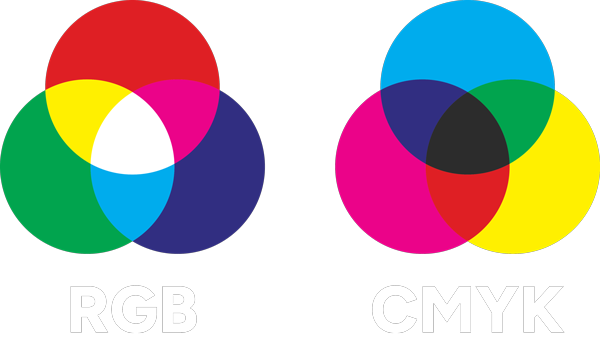
RGB and CMYK produce color in opposite ways.
| Model | Used For | Type | How Color Is Produced |
|---|---|---|---|
| RGB (Red, Green, Blue) | Screens, displays, digital interfaces | Additive | Combines emitted light; all channels at maximum produce white |
| CMYK (Cyan, Magenta, Yellow, Black) | Printed materials | Subtractive | Uses inks to absorb light; higher total ink generally yields darker colors |
Because one model adds light and the other subtracts it, they occupy different color spaces and cannot
reproduce exactly the same set of colors.
Color Gamut: Why Some RGB Colors Cannot Print
A color gamut is the range of colors a specific system can reproduce. The typical RGB
gamut used by screens (such as sRGB or Display P3) includes highly saturated colors that standard CMYK
printing simply cannot match.
Colors that often fall outside standard CMYK gamut include:
- Neon-like blues and greens
- Very intense reds and magentas
- Some vivid purples
On screen, these colors can appear extremely bright and saturated. In print, they are mapped to the
nearest reproducible CMYK values, which usually appear more muted or slightly shifted.
Why Print Does Not Match the Screen
Even for less extreme colors, printed output typically looks different from what appears on screen.
Several factors contribute to this:
- Different color models — converting between RGB and CMYK is not exact.
- Screen brightness — displays emit light, making colors appear more vivid.
- Paper properties — coated, uncoated, matte, and glossy stocks reflect light differently.
- Printer profiles and calibration — each printer and ink set interprets CMYK values through its own profile.
To manage this, professional workflows use ICC profiles and soft proofing to approximate how on-screen
colors will translate to specific presses and papers.
Designing in RGB vs Designing in CMYK
Many projects start in RGB, especially when they are primarily screen-based:
- Web and app UI design
- Social media graphics
- On-screen presentations
When the final output is intended for print (flyers, posters, packaging, business cards), it is helpful to:
- Use a CMYK document profile when setting up print-focused files
- Or at minimum, soft proof the design using the target CMYK profile before exporting
This reduces surprises and helps avoid choosing colors that sit far outside the printable gamut.
Converting from RGB or HEX to CMYK
There is no universal one-to-one conversion between RGB/HEX and CMYK because:
- The models cover different gamuts
- CMYK output depends on the printer, ink set, and substrate
Design tools use color profiles to select the best available CMYK values for a given target (for
example, a specific press standard like ISO Coated or US Web Coated).
A typical workflow:
- Work in RGB or HEX while designing for screen or mixed media
- Convert to a target CMYK profile when preparing print-ready files
- Check for noticeable shifts and adjust colors if necessary
Common Pitfalls
- Designing entirely in RGB for a print-only project and converting at the last moment
- Using highly saturated “neon” colors that cannot be reproduced in CMYK
- Ignoring paper type and assuming colors will match across stocks
- Skipping soft proofing or test prints for color-critical work
- Assuming online CMYK converters match a specific printer’s output exactly
Where CMYK Is Used
CMYK is the standard for most commercial and desktop printing:
- Flyers, brochures, and posters
- Business cards and stationery
- Magazines, catalogs, and books
- Packaging, labels, and product inserts
- Large-format prints, banners, and signage

Using CMYK Alongside Tools Like Swatching
In many projects, colors are first explored in RGB or HEX and later prepared for print. Understanding
CMYK helps you anticipate how those screen colors will translate to ink.
Tools like Swatching can support this workflow by helping you:
- Extract RGB or HEX values from images
- Build palettes for digital use, then review how they map to print-safe colors
- Maintain a consistent base palette across digital and printed assets
While Swatching operates in screen-based color spaces, combining it with CMYK-aware workflows and printer
profiles gives a clearer picture of what will happen when designs move from monitor to paper.